The Ultimate Inventory & POS Solution for Electronics & Electrical Retailers
Introduction: The Digital Shift in Local Retail
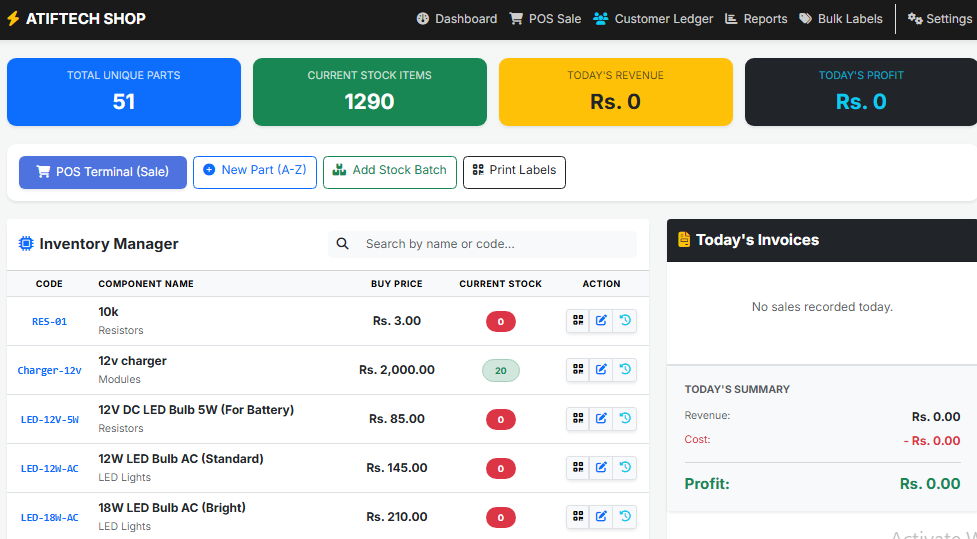
Managing an electronics shop, especially in bustling markets like Akbar Pura, presents a unique set of challenges. From tracking thousands of tiny resistors and ICs to managing the volatile prices of UPS boards and solar components, manual bookkeeping is no longer sufficient. The AtifTech Shop Inventory & POS System was developed to bridge this gap, providing a robust, web-based solution that fits in the palm of your hand.
Built using the reliable PHP and MySQL stack, this system is not just a digital notebook; it is a full-scale Enterprise Resource Planning (ERP) tool tailored for the electrical trade.
Core Features That Empower Your Business
1. A-Z Inventory Management with Branded QR Labels
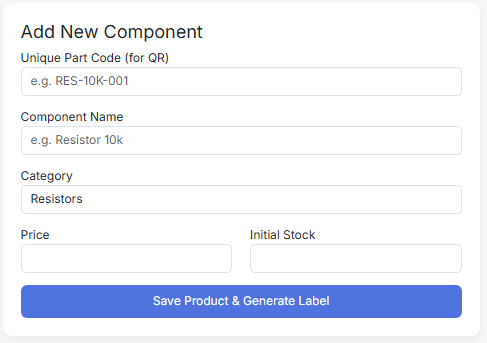
The heart of the system is the Inventory Manager. Every part, from a 10k resistor to a heavy-duty inverter transformer, is assigned a unique barcode. What sets AtifTech Shop apart is the Branded Label Generator. The system creates professional labels featuring the "ATIFTECH" brand, the item name, and a scannable QR code. By pasting these on component drawers, shop owners can identify and scan parts in seconds, eliminating the "search and find" struggle.
2. High-Speed POS Terminal with Manual Overrides
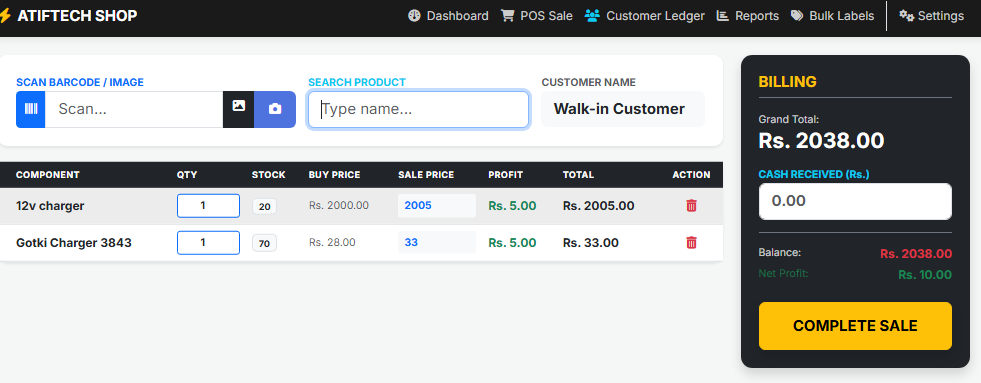
The Point of Sale (POS) terminal is designed for speed. It supports three types of inputs:
-
Hardware Scanning: Plug-and-play support for USB/Bluetooth scanners.
-
Camera Scanning: Use a laptop or mobile camera to scan codes live.
-
Image Upload: Scan barcodes directly from photos.
Crucially, the POS allows for Manual Keypad Entry. In the local market, prices can change daily. Technicians and shop owners can manually adjust the sale price and quantity directly on the screen. The system calculates the Net Profit live for every single transaction, providing instant financial clarity.
3. The "Udhaar" Ledger (Customer Debt Tracking)
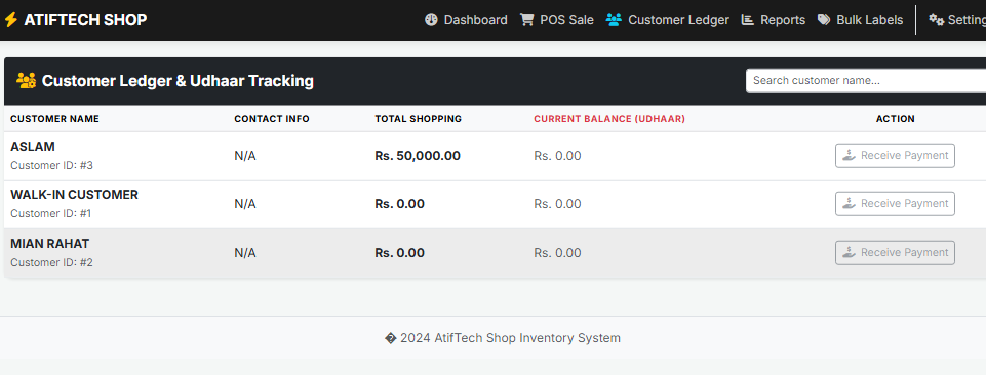
In many local businesses, partial payments and credit (Udhaar) are essential. AtifTech Shop handles this professionally. When a sale is made, the owner can enter the "Cash Received." If there is a shortfall, the system automatically logs the balance into the Customer Ledger. The Recovery Module then allows the owner to track payment history and settle balances as customers return to pay their debts.
4. Business Intelligence & Financial Reporting
AtifTech Shop provides a "Ledger View" of the entire business. Owners can filter reports by day, month, or year. Beyond just sales, the system calculates the Total Inventory Asset Value. This tells the owner exactly how much capital is currently "locked" in the stock sitting on the shelves, enabling better purchasing decisions.
Get Started: Live Access or Local Setup
We offer flexible deployment options depending on your needs:
-
Live Cloud Access: If you want to access your shop's data from anywhere in the world (Mobile, Tablet, or PC) via a secure live URL, we provide full hosting and setup services. This is ideal for shop owners who want to monitor their business remotely.
-
Localhost Project Handover: For those who prefer to keep their data on a single local computer or are looking to learn from the source code, we provide the complete project files and database setup for offline use.
🎓 Special Student Concession: We believe in supporting the next generation of engineers and developers. If you are a student looking for this project for learning purposes or as a foundation for your final year project, contact the admin for a Special Discounted Rate.
After Get this project then To run this locally on your PC using XAMPP, follow these steps:
-
Download and Install XAMPP: Ensure Apache and MySQL modules are installed.
-
Project Placement: Create a folder named myshop inside the C:/xampp/htdocs/ directory and paste the project files there.
-
Database Creation:
-
Open localhost/phpmyadmin.
-
Create a new database named atiftech_shop.
-
Click Import and select the .sql file provided with the project.
-
-
Configuration: Open db.php in a text editor and ensure the credentials match your local setup:
-
$host = "localhost";
-
$user = "root";
-
$pass = "";
-
-
Access: Open your browser and go to localhost/myshop/index.php.
Going Live: How to Request Live Installation
If you want to access your shop data from anywhere in the world via atiftech.com/myshop, you need a live web server.
Step-by-Step Live Setup:
-
Hosting & Domain: Secure a domain (like atiftech.com) and a cPanel-based hosting plan.
-
Upload Files: Use the cPanel File Manager to upload the project files to the public_html/myshop folder.
-
Live Database Setup:
-
Use MySQL Database Wizard in cPanel to create a new database and user.
-
Assign the user to the database with "All Privileges."
-
Import your SQL file via the live phpMyAdmin.
-
-
Update Connection: Edit the live db.php with the new database name, username, and password provided by your host.
-
SSL Requirement: Ensure your site has an SSL Certificate (HTTPS). Modern browsers will block camera access for the QR scanner if the site is not secure.
How to Purchase & Contact Admin
If you are ready to digitize your shop or want to purchase the source code for your studies, please contact us directly for a professional handover and installation support.
📲 Contact on WhatsApp: +92 344 9131707
(Click the number above to chat instantly)
Conclusion
The AtifTech Shop system is a testament to how specialized software can solve local business problems. By combining stock security, branded labeling, and transparent financial tracking, it allows shop owners to focus on what they do best: serving their customers and growing their trade. Whether you are starting with a 2 Lakh budget or managing a massive warehouse, AtifTech is the digital foundation your shop deserves.