itel IT-2166 Flash File, Format, Reset Code & IMEI Repair (CM2 SCR Guide)
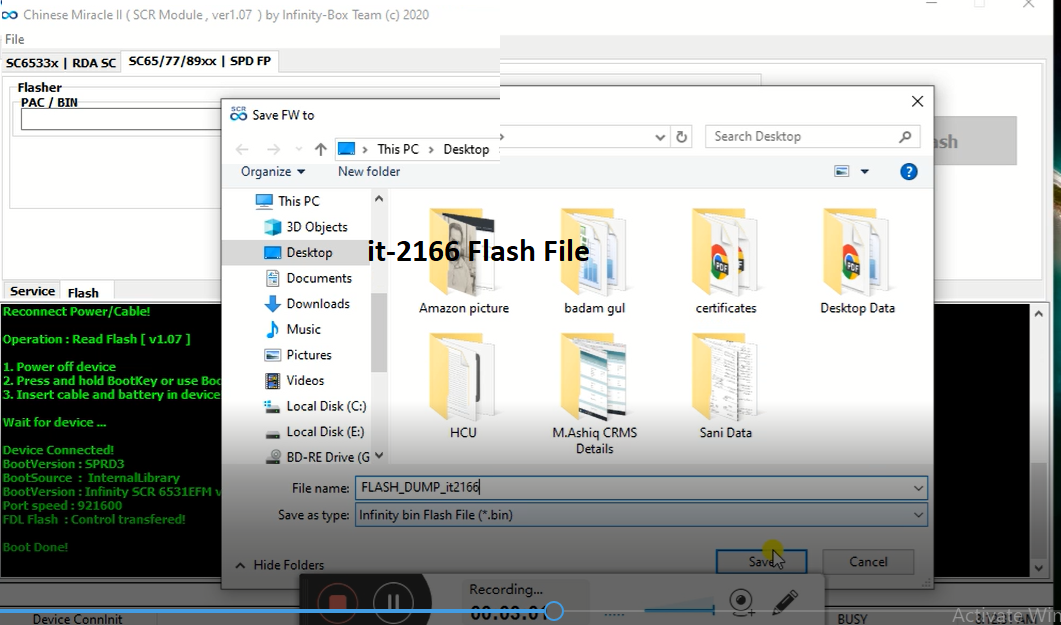
📱 itel IT-2166 Flash, Format & IMEI Repair Guide
If your itel IT-2166 is dead, hanging, password locked, or showing IMEI null/zero, you can fix it بسهولة using the correct flash file and CM2 SCR tool.
🔧 Common Problems
- Phone stuck on logo
- Auto restart issue
- Forgotten password
- IMEI becomes 000000000000000
- Dead after wrong flash
🔄 itel IT-2166 Format / Reset Code
Try these default codes first:
*2767*3855#
OR
*#0*#
👉 Note: This will erase all data.
💻 Flashing itel IT-2166 (Firmware)
Requirements:
- CM2 SCR Tool
- Correct itel IT-2166 flash file
- USB Cable
Steps:
- Open CM2 SCR Tool
- Select Feature Phone Module
- Load firmware file
- Click Flash
- Connect phone (powered off)
- Wait until flashing complete
🛠 IMEI Repair (IMEI = 0 Fix)
If IMEI is null or zero, follow:
- Open CM2 SCR Tool
- Go to Repair Section
- Select Write IMEI
- Enter original IMEI (from back sticker)
- Connect phone
- Click Repair
✅ Done — your IMEI will be restored.
⚠️ Important Notes
- Always backup before flashing
- Use correct firmware version
- Do not disconnect during process
- Use original IMEI only (illegal otherwise)
🎯 Conclusion
With the help of CM2 ACR, you can easily fix software issues, reset passwords, and repair IMEI on itel IT-2166 without professional tools.