How to Bypass Samsung J5 2016 FRP Lock Using SamFw Tool (One Click)
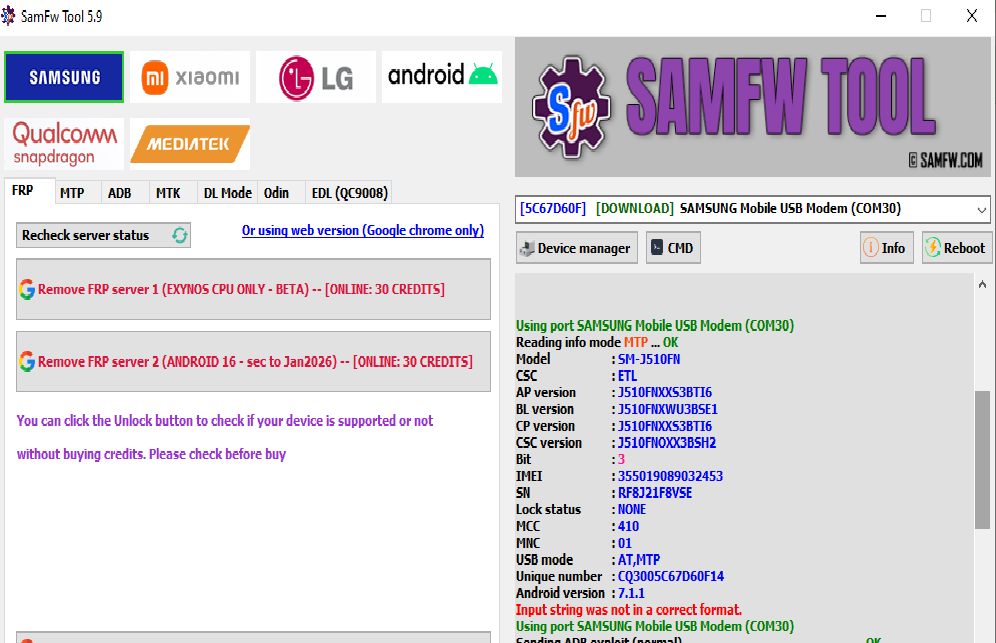
Performing a hard factory reset on a Samsung Galaxy J5 2016 (SM-J510) without removing the linked Google account triggers Factory Reset Protection (FRP). If you forget your original login details, you will remain stuck on the account authentication screen.Fortunately, you can bypass this security lock quickly and for free using the SamFw Tool. This step-by-step tutorial outlines how to use the built-in Samsung diagnostic test menu to clear the Google lock in just one click.
Prerequisites Before Starting
Before starting the unlock process, prepare the following items:
- A desktop computer or laptop running Windows OS.
- A functional, high-quality USB data cable to connect your phone.
- The official Samsung USB Drivers installed on your computer.
- The latest version of the SamFw Tool downloaded and extracted.
- Temporarily disable your Windows Antivirus or Windows Defender, as security programs often flag mobile service tools as false positives
-
Step-by-Step Guide to Remove FRP LockFollow these direct steps to unlock your device:Step 1: Open the Emergency Dialer on Your PhoneTurn on your locked Samsung J5 2016. Navigate back to the initial setup wizard greeting page. Tap on the Emergency Call button located at the bottom of the screen to launch the dialer pad.Step 2: Launch the Hidden Hardware Test ModeIn the emergency dialer, type the secret diagnostic code:
*#0*#As soon as you enter the last character, the phone will automatically open a white diagnostic menu filled with gray buttons like Red, Green, Blue, Receiver, Vibration, and Touch. Leave the phone sitting on this screen.Step 3: Connect to the PC and Run SamFw ToolPlug your USB cable into the phone and connect it to your computer. Open the extracted folder on your PC, right-clickSamFwTool.exe, and select Run as administrator.Step 4: Trigger the FRP Reset CommandLook at the top menu tabs within the tool software and click on the Samsung category. Under the sub-tab selection, locate the option labeled Remove FRP (or Remove FRP (older than 2022) specifically optimized for older Android versions) and click it.Step 5: Authorize USB Debugging PromptWatch your computer screen carefully. The tool will send a command script to your mobile phone. Within a few moments, a prompt will appear on your Samsung J5 screen reading "Allow USB debugging?"- Check the box that says "Always allow from this computer".
- Tap the OK or Allow button on the phone screen.
Step 6: Wait for Completion and RebootThe software will now automatically communicate with the device via ADB mode to clear the security partition. The tool status window will display progress lines before finally showing a "Remove FRP... OK" success message. Your device will automatically restart into the normal operating system.Download official tool and visit official site of SamFirmre