FAYAW F222 Flash File, Boot Key & Repair Guide (CM2 SCR Tool)
FAYAW F222 Flash & Repair Guide: Boot Key and Firmware Guide
Welcome to AtifTech.com. If you are dealing with a FAYAW F222 feature phone that is hanging on the logo, locked with a privacy password, or needs a complete firmware re-installation, this guide is for you.
🛠️ Device Technical Specifications
✅ Chipset: Spreadtrum SC6530
✅ Platform: SPD Feature Phone
✅ Flash Type: NOR (4MB-8MB)
✅ Tool Required: Infinity-Box CM2 SCR Module
🔑 FAYAW F222 Boot Key
To connect the phone to your PC for flashing or formatting, you must use the correct boot key:
➡️ Primary Boot Key: The Center Navigation Button (OK Key).
➡️ Connection Method: Power off the phone, remove and re-insert the battery. Hold the OK Key, and then connect the USB cable.
🚀 How to Flash / Format using CM2 SCR
Follow these instructions to service your device using the CM2 SCR Tool:
🔹 Step One: Open the CM2 SCR Module on your PC.
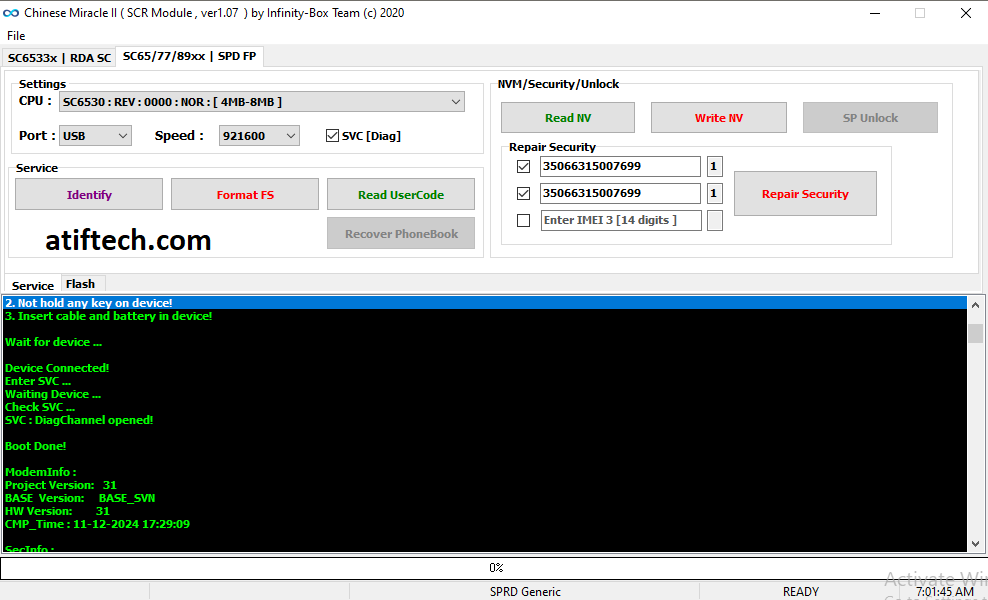
🔹 Step Two: Navigate to the "SC65/77/89xx | SPD FP" tab.
🔹 Step Three: Under Settings, select CPU: SC6530 : REV : 0000 : NOR.
🔹 Step Four: Click the Identify button first to check the connection.
🔹 Step Five: If you want to remove a password, click Format FS in the Service tab.
🔹 Step Six: If you want to flash, go to the Flash tab, load your firmware file, and click Write Flash.
⚠️ Important Tips for Success
💎 Backup First: Always click "Read NV" before doing any operation to save your original security data.
💎 Battery Power: Ensure the phone battery is at least 50% charged.
💎 Drivers: Make sure the Spreadtrum (SPD) USB Drivers are installed in your Device Manager.
For more mobile repairing guides and the latest firmware files, keep visiting AtifTech.com!