E-TACHI B13-Star Flash File, Password Reset, and IMEI Repair Guide (CM2 SCR Module)
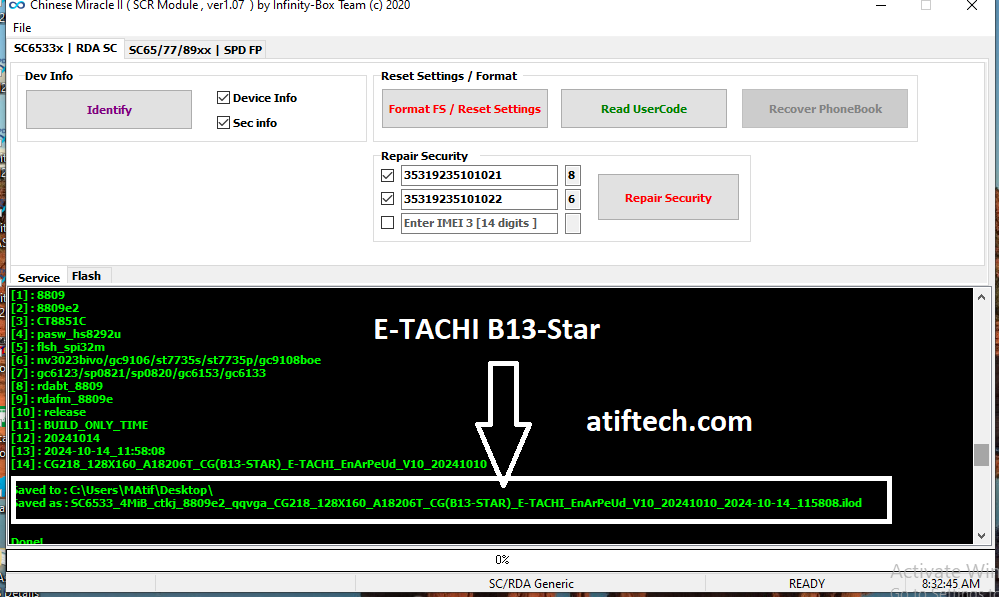
The E-TACHI B13-Star is a popular feature phone, but like all mobile devices, it can encounter software issues such as being stuck on the logo, forgotten privacy passwords, or corrupted IMEI information. In this guide, we will show you how to use the Infinity-Box Chinese Miracle II (CM2) SCR Module to service this device.
Supported Features for E-TACHI B13-Star:
Using the CM2 SCR Module (ver 1.07 or later), you can perform the following tasks:
-
Identify Device: Get full hardware and software details.
-
Format FS / Reset Settings: Easily remove phone locks or privacy passwords without losing firmware.
-
Read UserCode: Recover forgotten passwords without wiping data.
-
Flashing: Write original firmware to fix hanging or dead boot issues.
-
Repair Security (IMEI): Restore original IMEI numbers if they become "0000" or invalid after a flash.
Device Technical Details:
-
CPU: Spreadtrum/RDA (SC6533x / SC6531)
-
Model: E-TACHI B13-Star
-
Tool Used: CM2 SCR Module v1.07
-
File Extension: .ilod (CM2 specific backup format)
How to Flash/Service E-TACHI B13-Star:
-
Open the CM2 SCR Module.
-
Select the correct CPU platform (SC6533x / RDA SC).
-
Click on Identify and connect the phone (usually by holding the Boot Key/Center key and inserting the USB cable).
-
To remove a password, click Format FS.
-
To fix software bugs, go to the Flash tab, load your firmware file, and click Write Flash.
-
To restore original IMEI, enter the numbers in the Repair Security section and click the button.
Note: Always make a backup of your original firmware before performing any operations!